Introduction
While authentication checks who I am, authorization checks what I can do. This article will cover the different tactics on how to secure the application with authorization.
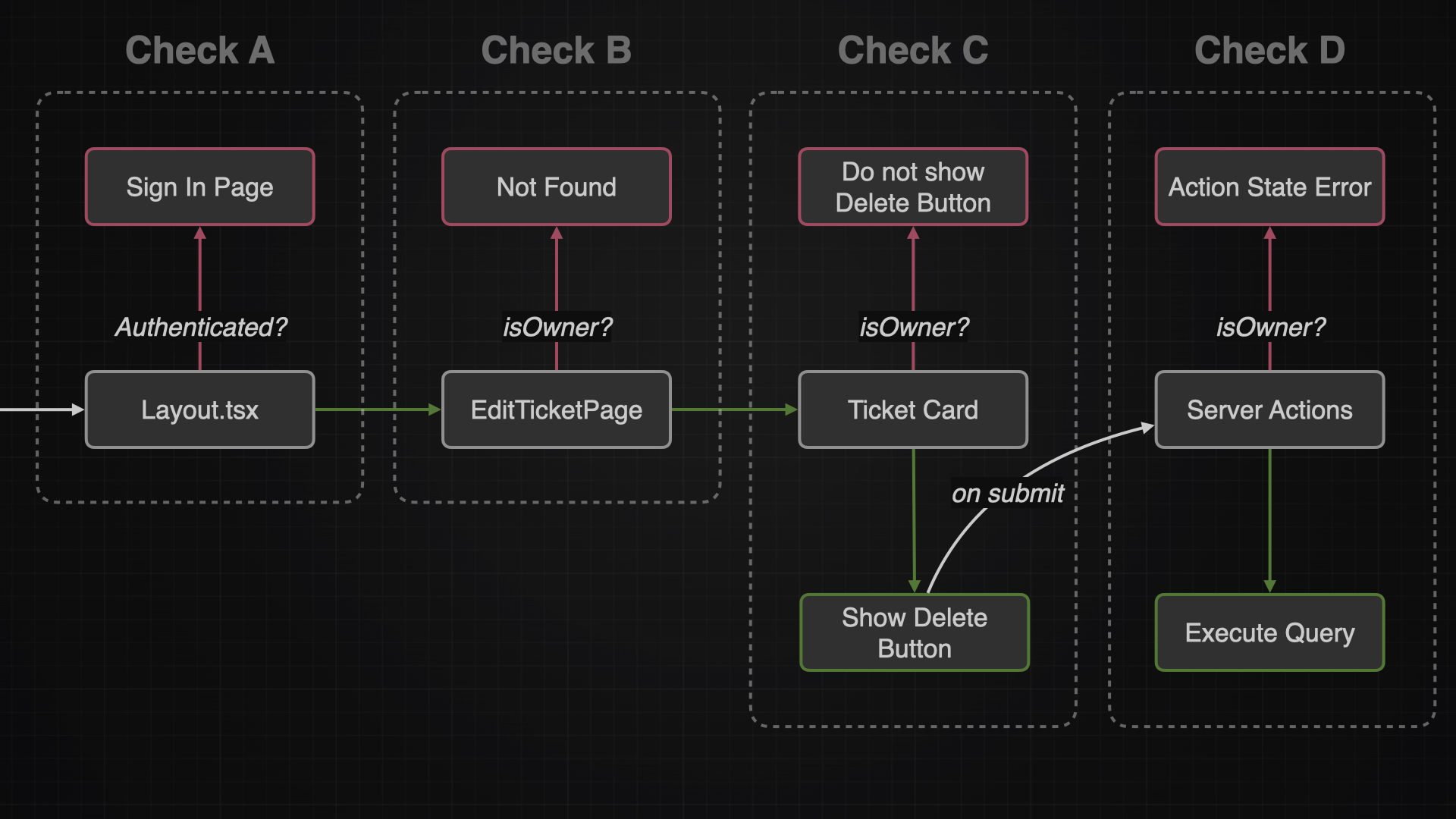
| Overview |
|---|
| When to authorize? |
| Authorize via Layout Page |
| Authorize Edit Ticket Page |
| Authorize Server Actions |
| Authorize UI Components |
| More on Authorization |
When to authorize?
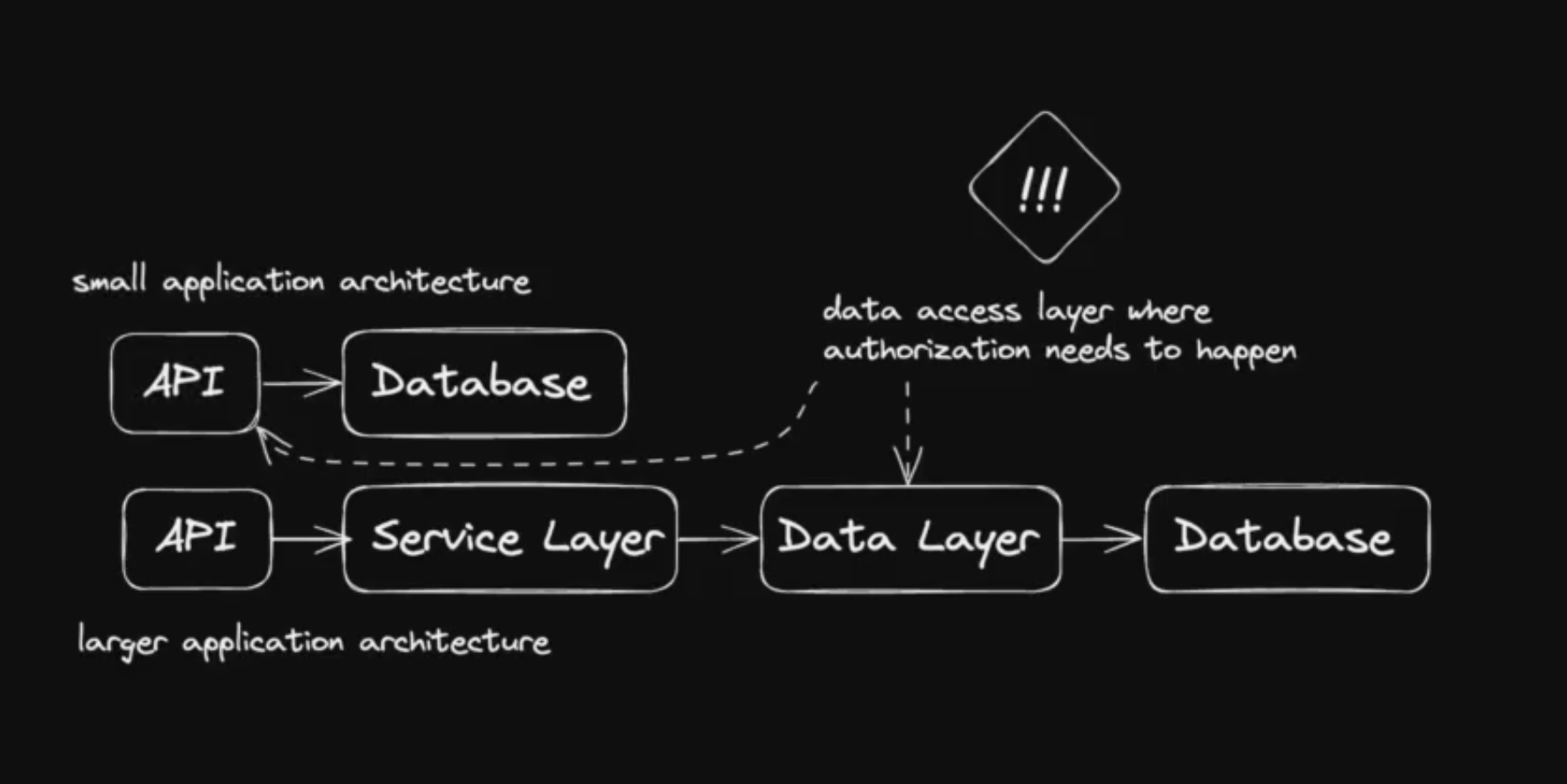
It’s a common saying that authorization should happen as close as possible to the data source. While authorizing users in the frontend is a good start, it’s very important to check the users once again in the data access layer (server actions or queries)
Authorize via Layout Page
One simple approach to authenticate the user is in the layout. With that I can make sure that all children pages of this layout, won’t be shown to unauthorized users.
This approach might be convenient but it’s not the most secure way and can be bypassed.
To avoid a user bypassing the layout athorization, I could implement the authorization in each page instead. However this approach is error-prone and not maintainable in the long run.
Since I am gonna implement a double check in the data access layer, I will accept and live with the risk of bypassing my layout page.
get-auth-or-redirect
This file will check via the getAuth function if a user is authenticated. And if not, it will redirect the user to the signInPage. I decided to create a own file, so I can easily reuse the logic later somewhere else again.
src/features/auth/queries/get-auth-or-redirect.tsimport { redirect } from "next/navigation";
import { signInPath } from "@/paths";
import { getAuth } from "./get-auth";
export const getAuthOrRedirect = async () => {
const auth = await getAuth();
if (!auth.user) {
redirect(signInPath());
}
return auth;
};
Layout
This layout will render and protect the TicketPage, TicketDetailPage and TicketEditPage. It does so with using the getAuthOrRedirect function
import { getAuthOrRedirect } from "@/features/auth/queries/get-auth-or-redirect";

export default async function AuthenticatedLayout({
  children,
}: Readonly<{
  children: React.ReactNode;
}>) {
  await getAuthOrRedirect();

  return <>{children}</>;
}
Authorize Edit Ticket Page
Only the owner of a ticket should be able to to edit it. So every time a user wants to edit a ticket, I need to make sure he is indeed the owner.
isOwner
src/features/auth/utils/is-owner.tsimport { User as AuthUser } from "lucia";
type Entity = {
userId: string | null;
};
export const isOwner = (
authUser: AuthUser | null | undefined,
entity: Entity | null | undefined,
) => {
if (!authUser || !entity) {
return false;
}
if (!entity.userId) {
return false;
}
if (entity.userId !== authUser.id) {
return false;
} else {
return true;
}
};
TicketEditPage
const TicketEditPage = async ({ params }: TicketEditPageProps) => {
  const { user } = await getAuth();
  const { ticketId } = await params;
  const ticket = await getTicket(ticketId);

  const isTicketFound = !!ticket;
  const isTicketOwner = isOwner(user, ticket);

  if (!isTicketFound || !isTicketOwner) {
    notFound();
  }

  return (...);
};
Authorize UI Components
Depending on the user, I might want to show them an edit button (if they own the ticket) or hide this functionality from them.
const TicketItem = async ({ ticket, isDetail }: TicketItemProps) => {
  const { user } = await getAuth();
  const isTicketOwner = isOwner(user, ticket);

 // show or not via conditional rendering
  const editButton = isTicketOwner ? (
    <Button variant="outline" size="icon" asChild>
      <Link prefetch href={ticketEditPath(ticket.id)}>
        <LucidePencil className="h-4 w-4" />
      </Link>
    </Button>
  ) : null;


  return (...);
};
Authorize Server Actions
The most important authorization happens in the data layer. This is the place where a user can interact with the database and therefore manipulate or read data. So i need to make sure a user is authenticated and owns the ticket he wants to manipulate.
export const deleteTicket = async (id: string) => {

  // logic could be extracted into own file
  const { user } = await getAuthOrRedirect();

  try {
    const ticket = await prisma.ticket.findUnique({
      where: {
        id,
      },
    });

    if (!ticket || !isOwner(user, ticket)) {
      return toActionState("ERROR", "Not authorized");
    }

    // delete ticket, revalidate paths, set cookies
};
Middleware (not recommeded)
Another alternative is to use middleware functions to authorize users. Middleware functions are executed before the page function is called, and they are a good place to perform pre-flight checks on the cookie (e.g. if there is a session in a cookie at all). But they are not suitable for making database queries, because they would halt the server with every request made to it.
// src/middleware.ts
import type { NextRequest } from "next/server";
import { NextResponse } from "next/server";
import { getAuth } from "./features/auth/queries/get-auth";
import { signInPath } from "./paths";

export async function middleware(request: NextRequest) {
  const auth = await getAuth();

  if (!auth.user) {
    return NextResponse.redirect(new URL(signInPath(), request.url));
  }
}

export const config = {
  matcher: "/tickets",
};

// above code is just an example for authorization in middleware
// but we will not use it
// because it would halt the server on every request
// causing a bad user experience
// one could use middleware for pre-flight checks on the cookie though