Introduction
While Lucia might be deprecated, it is still a great way to get started with authentication and learn the basics. One of the big benefits with Lucia is, that there are no third-parties required. The full authentication lives within my code.
Important: Lucia is deprecated and should only be used for learning purposes.
Installation
To get started with lucia I need to run this command:
npm install lucia @node-rs/argon2 @lucia-auth/adapter-prisma --forceLucia.ts
Configures and connects lucia with the prisma schemas
In order to be able to setup lucia and connect it with my prisma database, I need the lucia.ts file:
src/lib/lucia.tsThe content is mostly copied from the lucia documentation. Important for now is just to know, that the PrismaAdapter enables the connection between my prisma database and lucia.
import { PrismaAdapter } from "@lucia-auth/adapter-prisma";
import { Lucia } from "lucia";
import prisma from "./prisma";

// Connect lucia with prisma schemas
const adapter = new PrismaAdapter(prisma.session, prisma.user);

export const lucia = new Lucia(adapter, {
  sessionCookie: {
    expires: false,
    attributes: {
      secure: process.env.NODE_ENV === "production",
    },
  },
  getUserAttributes: (attributes) => ({
    username: attributes.username,
    email: attributes.email,
  }),
});

declare module "lucia" {
  interface Register {
    Lucia: typeof lucia;
    DatabaseUserAttributes: DatabaseUserAttributes;
  }
}

interface DatabaseUserAttributes {
  username: string;
  email: string;
}
Database Schemas
A proper authentication will always require users and sessions. Therefore I need to create new prisma schemas:
/prisma/schema.prismaEvery user should get a session once he logs in. This session should be deleted again when he logs out (This logic will be implemented in the code not in the schema). The session should also be deleted once the user gets deleted (Cascade). The index will speed up the processing when sessions are filtered against userId’s.
model User {
  id           String    @id @default(cuid())
  username     String    @unique
  email        String    @unique
  passwordHash String
  sessions     Session[]
}

model Session {
  id        String   @id
  expiresAt DateTime
  userId    String
  user      User     @relation(references: [id], fields: [userId], onDelete: Cascade)
  @@index([userId])
}
Once created, I need to sync the database.
Sign up
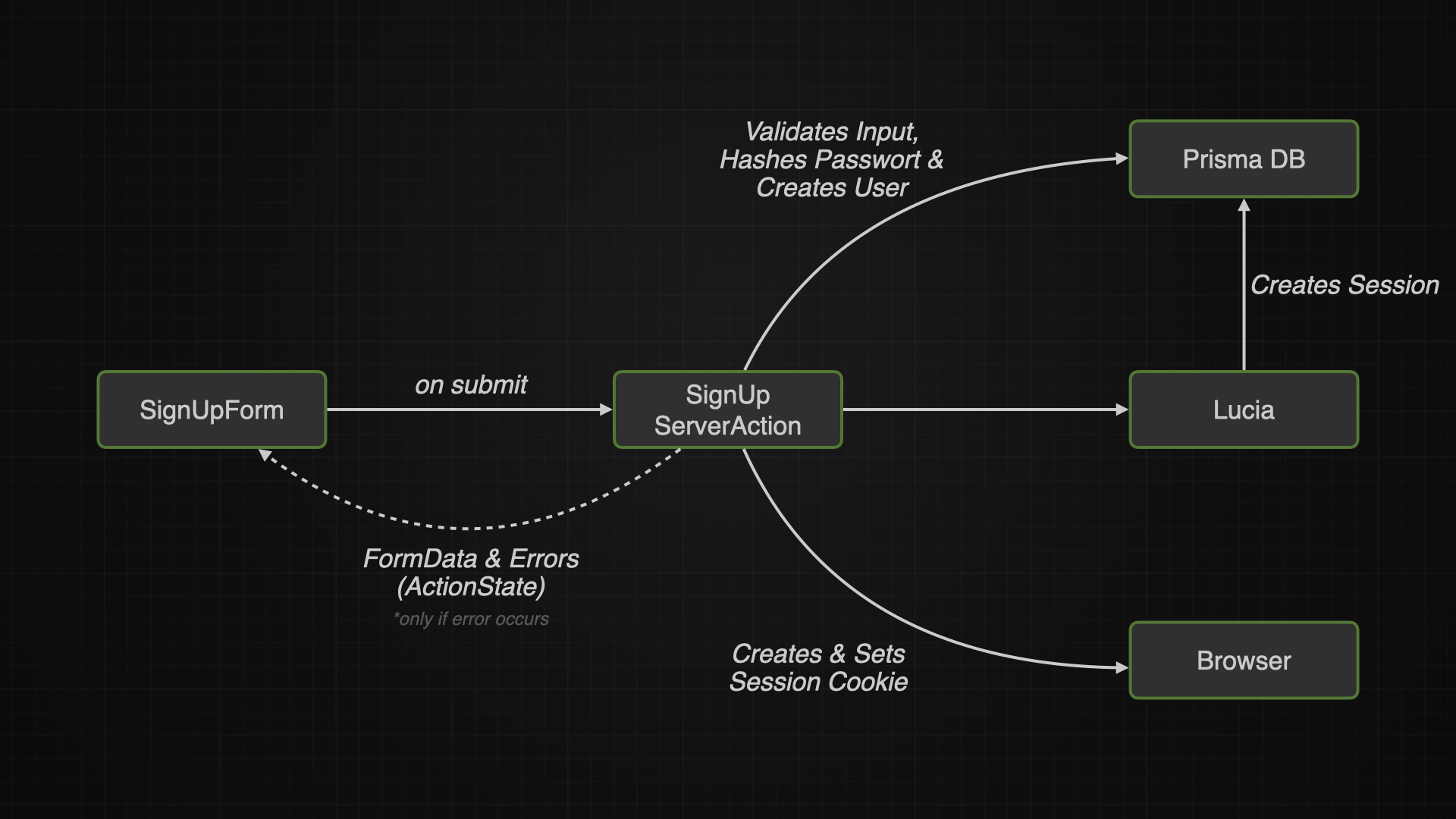
Sign up page
The sign up page dosen’t need to be special, a simple CardComponent that carries the sign up form, should do the job.
👨🏽💻 View code here: Sign up page
Sign up form
The sign up form will implement a useActionState to bind the signUp action as well as the ActionStates to the form.
| Source |
|---|
| 📜 More about how the ActionState works |
| Besides that it will only contain the [[📜 Forms Components Explained#form |
👨🏽💻 View code here: sign-up-form.tsx
Sign up server action
The server action is where all the magic happens. It will:
- Validate the Inputs via zod
- Creates a passwordHash from the password (avoids plain password in db)
- Creates a user
- Creates session & session cookies
- Sets cookies
- Creates ActionState on error
👨🏽💻 View code here: sign-up.ts
Sign in
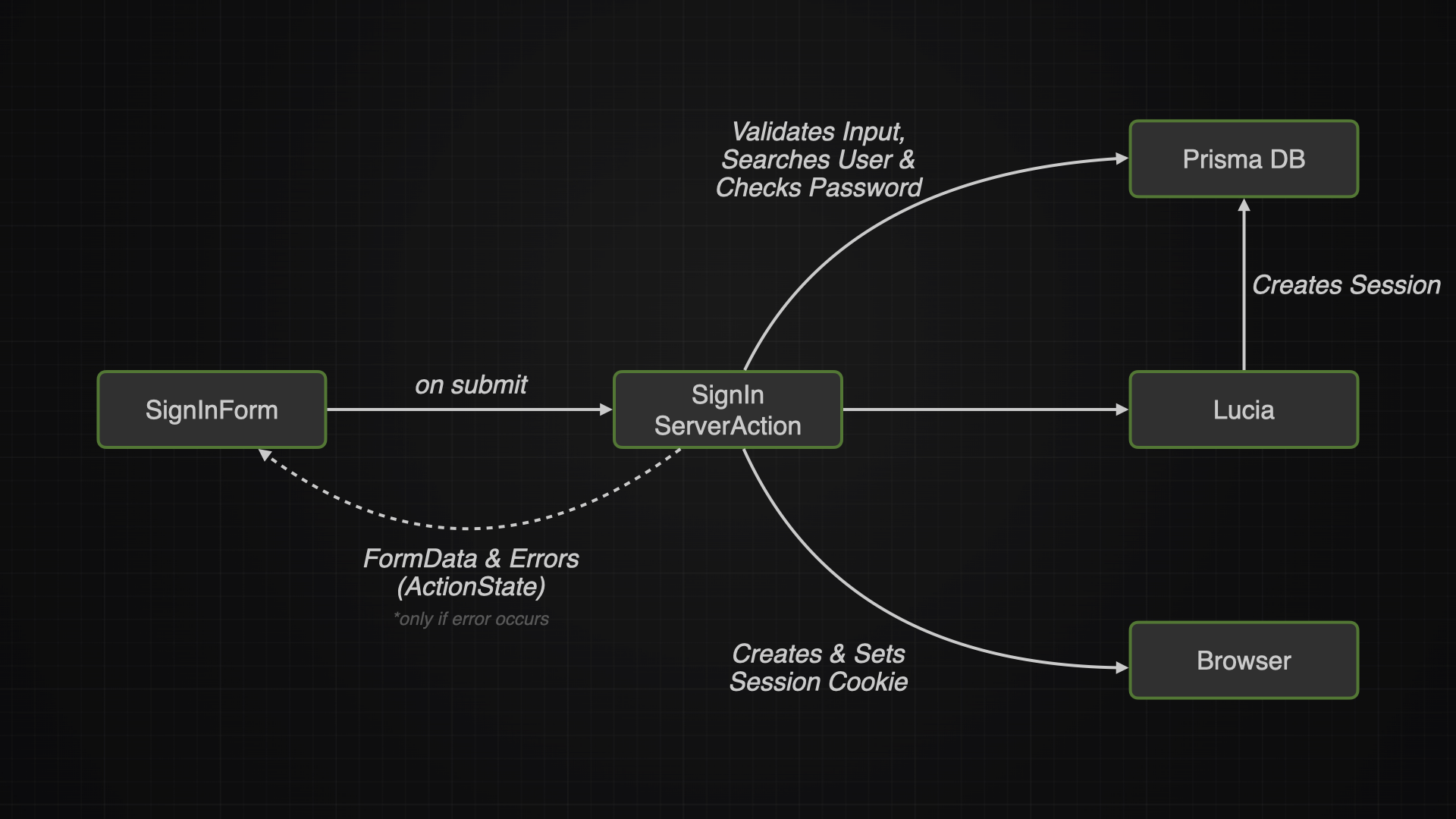
The page and sign in form are basically the same like with the sign up, so I won’t document the code again. But I will attach a screenshot:
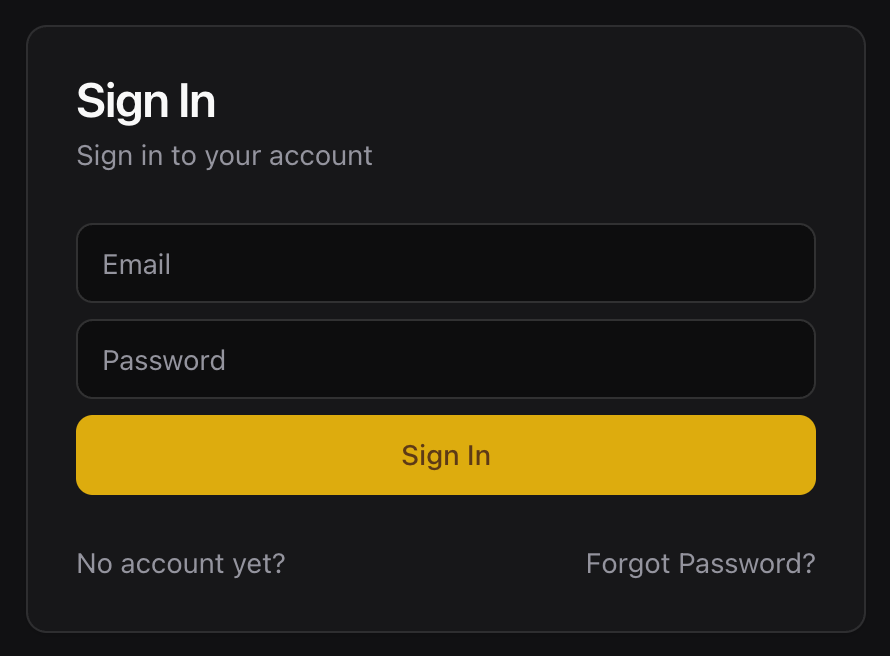
Sign in server action
The server action is where all the magic happens. It will:
- Validate the Inputs via zod
- Searches user in database
- Checks if password matches hash
- Creates session & session cookies
- Sets cookies
- Creates ActionState on error
👨🏽💻 View code here: sign-in.ts
Sign out
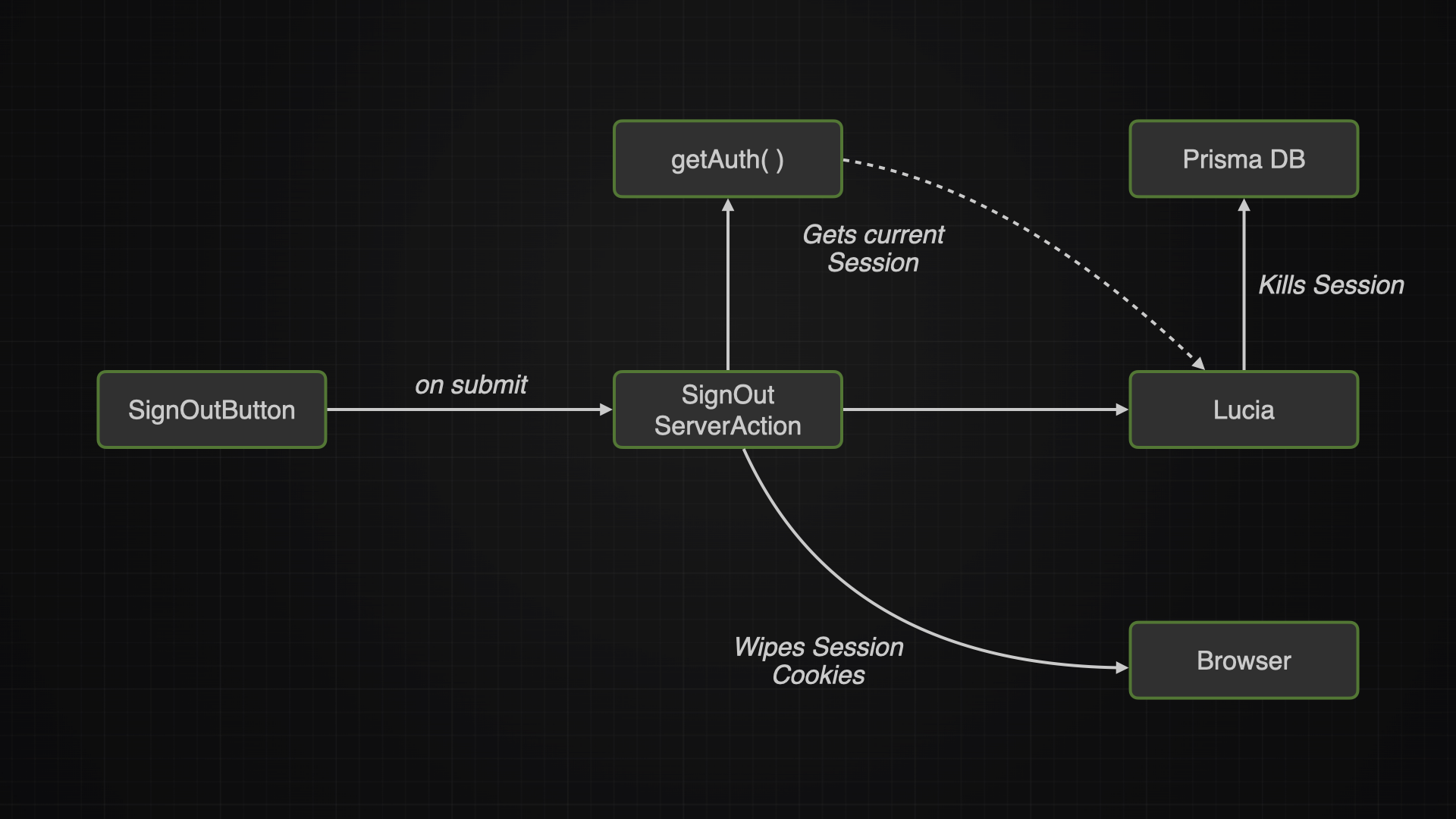
Dosen’t have a dedicated form but rather just a button and an ActionState
Sign out server action
The server action is where all the magic happens. It will:
- Gets the current session
- Kills and deletes the session via lucia from the database
- Wipes the session cookies
👨🏽💻 View code here: sign-out.ts
Get Auth
The getAuth function covers this logic:
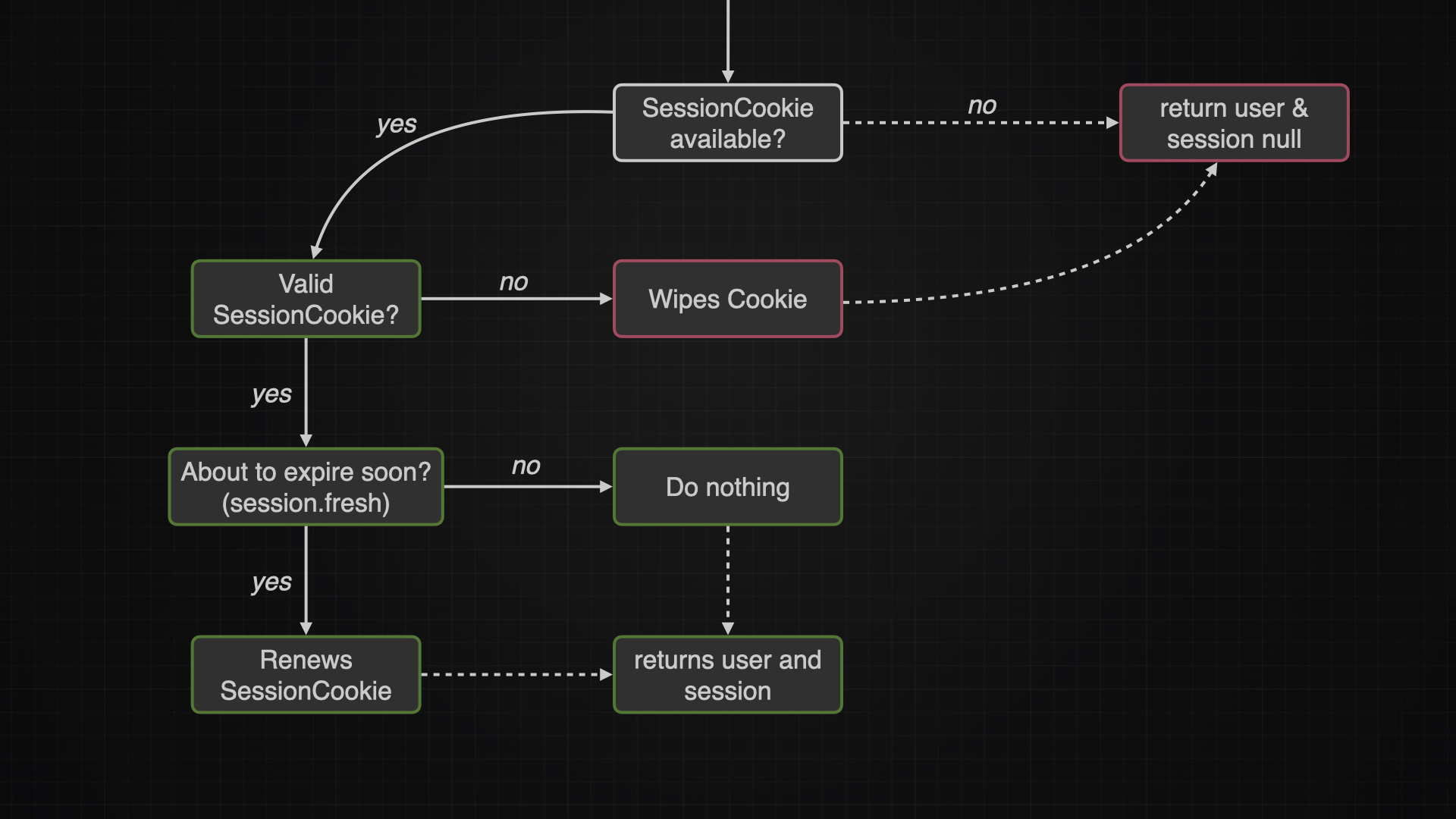
Note: ServerActions can read and write cookies, ServerComponents can only read them and are not allowed to write.
👨🏽💻 View code here: get-auth.ts
Dynamic UI
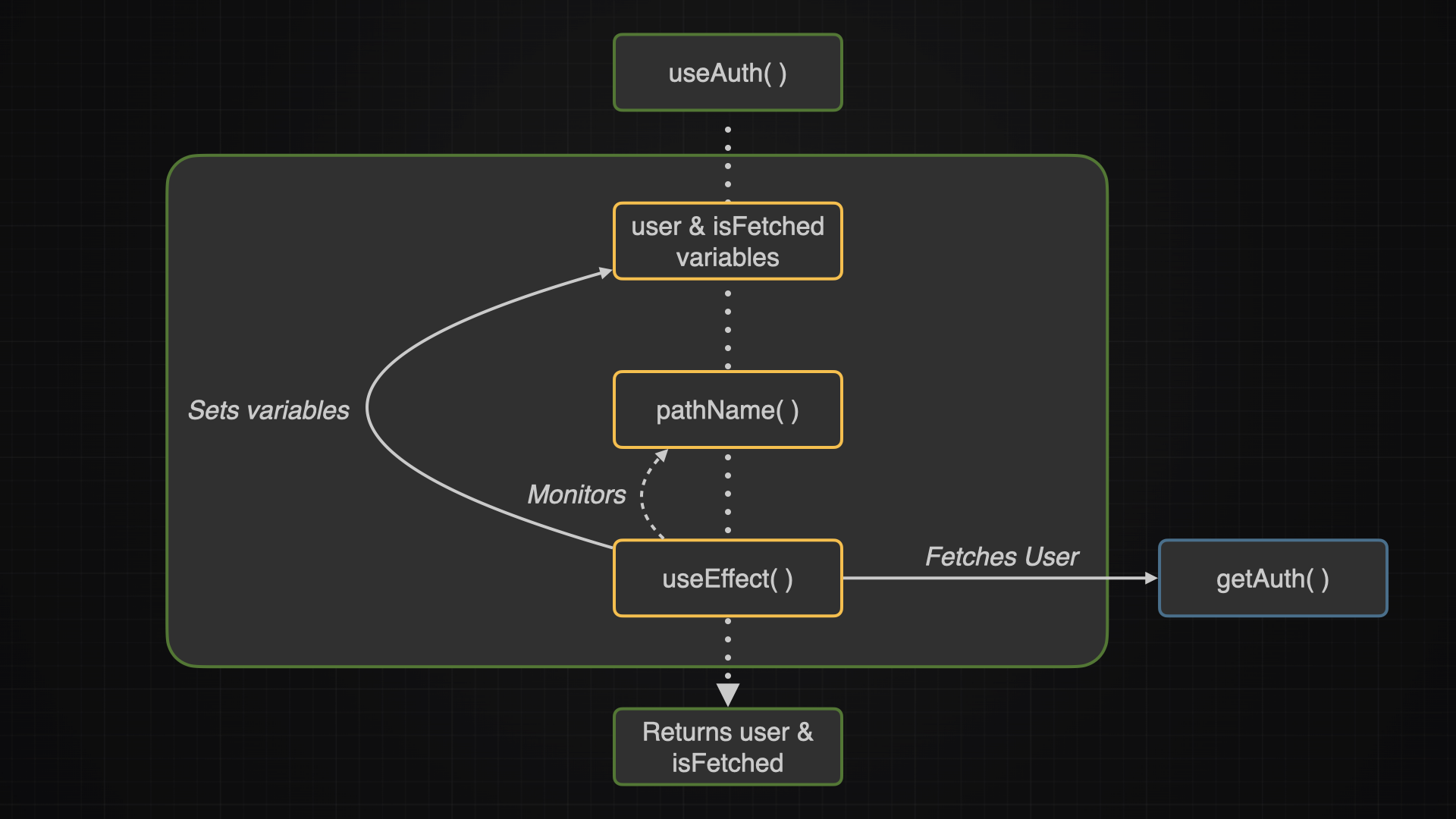
useAuth()
The useAuth function fetches the current user via the getAuth function. The useAuth function can now be used in any component which needs a responsive UI according to the fact whether a user is signed in or not.
Header
The header component will check if a user is signed in via the useAuth function. While the useAuth function is fetching the user, the header will return null. Only when the fetch is done, the header gets rendered.
To make this delayed rendering less obviously, I can use an animation like animate-fade-from-top
const Header = () => {
  const { user, isFetched } = useAuth();

  if (!isFetched) {
    return null;
  }

  const navItems = user ? (
    // show if user is logged in
  ) : (
    // else show this
  );

  return (
    // ...
  );
};

export { Header };
Conclusion
Even though Lucia is deprecated and should not be used anymore for production environments, it still teached me a lot about authentication.