Introduction
Next.js improves the routing experience already by default extremely. But for fulling understanding and appreciating the work Next.js has done for me, I need to get familiar with some routing concepts first.
| Overview |
|---|
| Next.js Link - like a but better |
| Server Rendering |
| 2 Kinds of Server Rendering |
| Prefetching |
| Streaming |
| Clientside transitions |
| Slow rendering issues |
Next.js Link - like a but better
Usually for creating links between components I use hmtls a element. However this is pretty raw and unoptionized. If I use the a element to navigate between pages, my app will completely reload every single page even if I only move for- and backwards. Since that will end in a lot of unnecessarily requests, Next.js offers a better solution, the Link Element. To understand why its better, I need to known the following concepts.
Server Rendering
Usually components are by default server components. This means they get rendered on the server first and then afterwards get sent to the client. But this takes some time and I don’t want the user to have to wait. Thankfully Next.js helps me here with prefetching pages that the user is most likely to visit.
2 Kinds of Server Rendering
In Next.js there are two kinds of server rendering, that server different purposes:
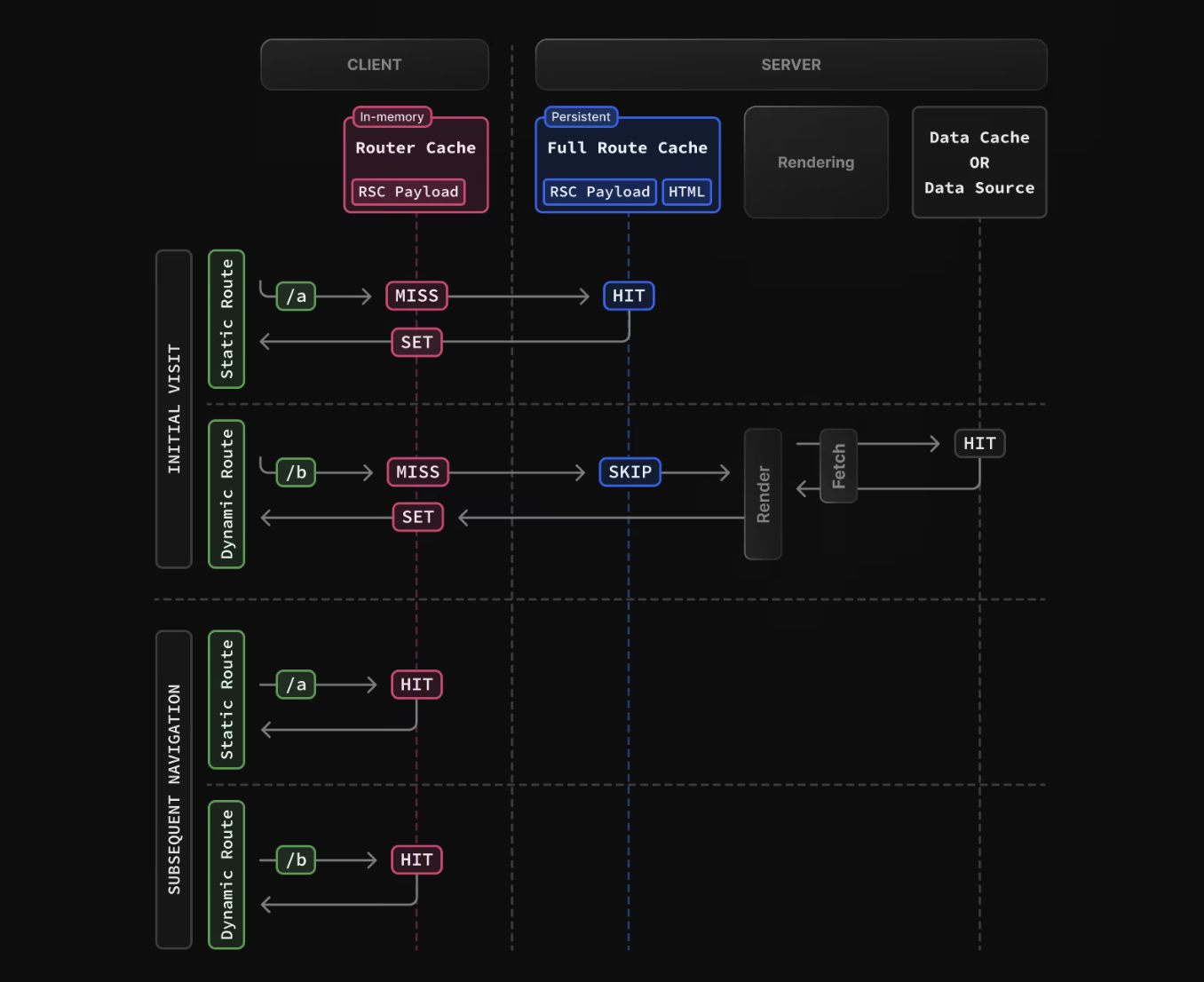
Static rendering: Data gets rendered and cached on the server by built time or revalidation. Every user will receive the same cached data which makes it fast and cheap. The static data can also be re-validated at a defined time.
Dynamic rendering: The data gets only rendered once a user requests it, no content sharing with other users. This takes a little more time and is more expensive but still pretty fast. The big benefit is that I can make sure that each user gets always fresh data and not cached one.
Prefetching
Next.js will automatically load the content of the Pages that a user might visit. Once a Link component enters the viewport of a client, Next.js will go an prefetch the linked component automatically futureLink🖇️ . This will make the navigation feel almost instantly. However if the server rendering is dynamic, it can happen that the user needs to wait for the content. To improve the user experience in this case, I can use streaming.
Streaming
I don’t want the user to get the impression that the website isn’t responding just because its waiting for dynamic rendered server data. With streaming I can send already loaded content step by step so the user sees that something is happening. Shared layouts or loading skeletons (loading.tsx) is sent ahead and swapped once the final content got loaded. I can also define which content should come instantly and which is suspended futureLink🖇️ and comes later.
Clientside transitions
In order to avoid losing React state or scroll position - which typically happens when a full page reload occurs - Next.js performs client-side transitions when navigating with the Link component. Instead of reloading the entire document, Next.js keeps the existing React tree mounted and fetches only the server-rendered data needed for the next route. React then updates only the parts of the UI that changed, allowing state, layout, and scroll position to be preserved.
layout.tsx  ← stays mounted
page.tsx    ← replaced
Slow rendering issues?
Whenever I have issues with slow rendering, I should make sure I followed these best practices of Next.js
Conclusion
While this was a lot of theory and terminology, I know it’s very important to be familiar with these concepts. These are concepts that I will encounter many times when developing applications and are also key elements in improving the user experience. Btw. this article was fully based on this Next.js Documentation: